What is an agent harness?
Harness, loop engineering and LLM Ops explained with one diagram, built block by block.
“Harness means we’re building this agent framework to control this large language model, so that it works the way we want.”Sean Chen, at 4:35 in the video
A large language model (LLM) can answer almost any general question. The LLM knows nothing about you, your business or how you want the work done. The harness is the software around the model that supplies those three things.
In plain words
- HarnessThe harness is everything you build around the model: memory, tools, rules and the loop. The harness decides what the model sees and what the model is allowed to do.
- LoopThe loop lets the agent call tools several times in one task. Loop engineering is deciding when the agent has done enough and must stop.
- LLM OpsLLM Ops is the feedback system outside the harness. LLM Ops records every run, scores the run, finds what broke and ships a fix.
- EvalEval is the scoring step inside LLM Ops. Eval answers one question: was this run good?
Sean’s claim is that none of these four ideas is complicated. Each one is a small building block. The value comes from stacking the blocks in the right order.
The horse and the harness
The word comes from horse riding. A harness is the set of straps and tools a rider uses to control a horse.
In Sean’s picture the LLM is the horse. The horse is powerful and can run anywhere. A rider without a harness can get hurt, or can end up somewhere random. A rider in a battle cannot afford either result.
There is a technical reason behind the picture. An LLM predicts the probability of the next word. Anything built on probability carries randomness. A business task usually needs less randomness, and the harness is how you remove the randomness you do not want.
Start with one agent run
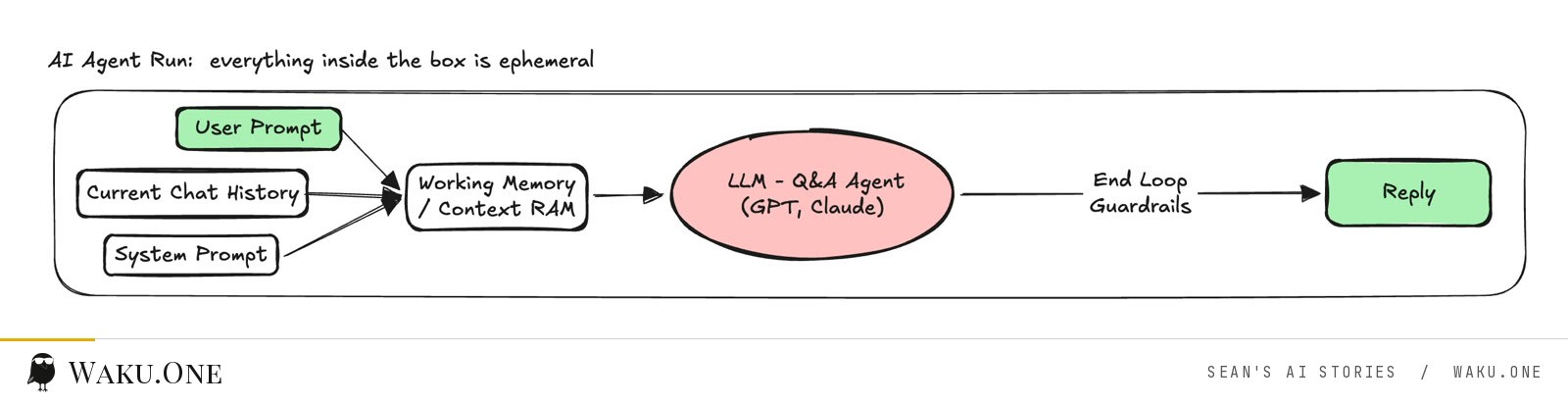
An agent run is one trip from a user’s question to the agent’s reply. Sean’s example question is “When was Sam Altman fired from OpenAI?”
Working memory, also called context RAM, is the text the model can see during that one run. Working memory holds three things: the user prompt, the current chat history and the system prompt, which is the standing instruction for how the agent should behave.
A run is ephemeral, which means the run keeps nothing once the reply is sent. The model answers from the three inputs and then forgets them. That is fine for a single question and too little for real work.
Add three kinds of memory
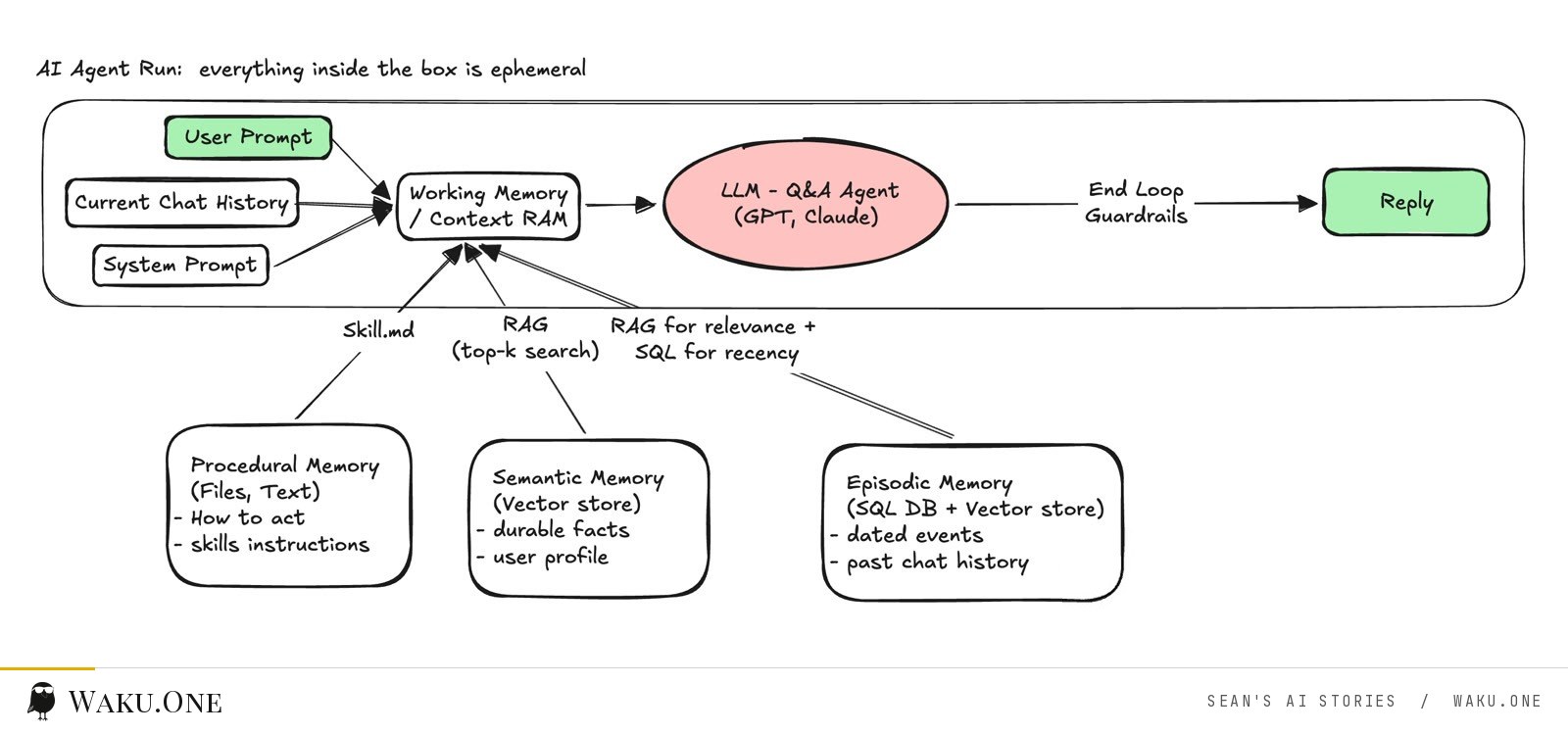
| Memory | What it holds | Sean’s example | Usual form |
|---|---|---|---|
| Procedural | How the agent should act, and the instructions for each skill. | “Talk to me like Elon Musk grilling Sam Altman.” | Files and text. A skill is a piece of text in a markdown file. |
| Semantic | Durable facts the model was never trained on. | Who Sean is and what he built, so the agent can compare his startup journey with Sam Altman’s. | Facts in a vector store. |
| Episodic | Past events and past chats that are not in the current conversation. | “When was the last time I prepared a job application?” | A long list of events with timestamps. |
All three exist for the same reason. The model knows a great deal about the world and nothing about the person or the software running it.
Draw the harness around it
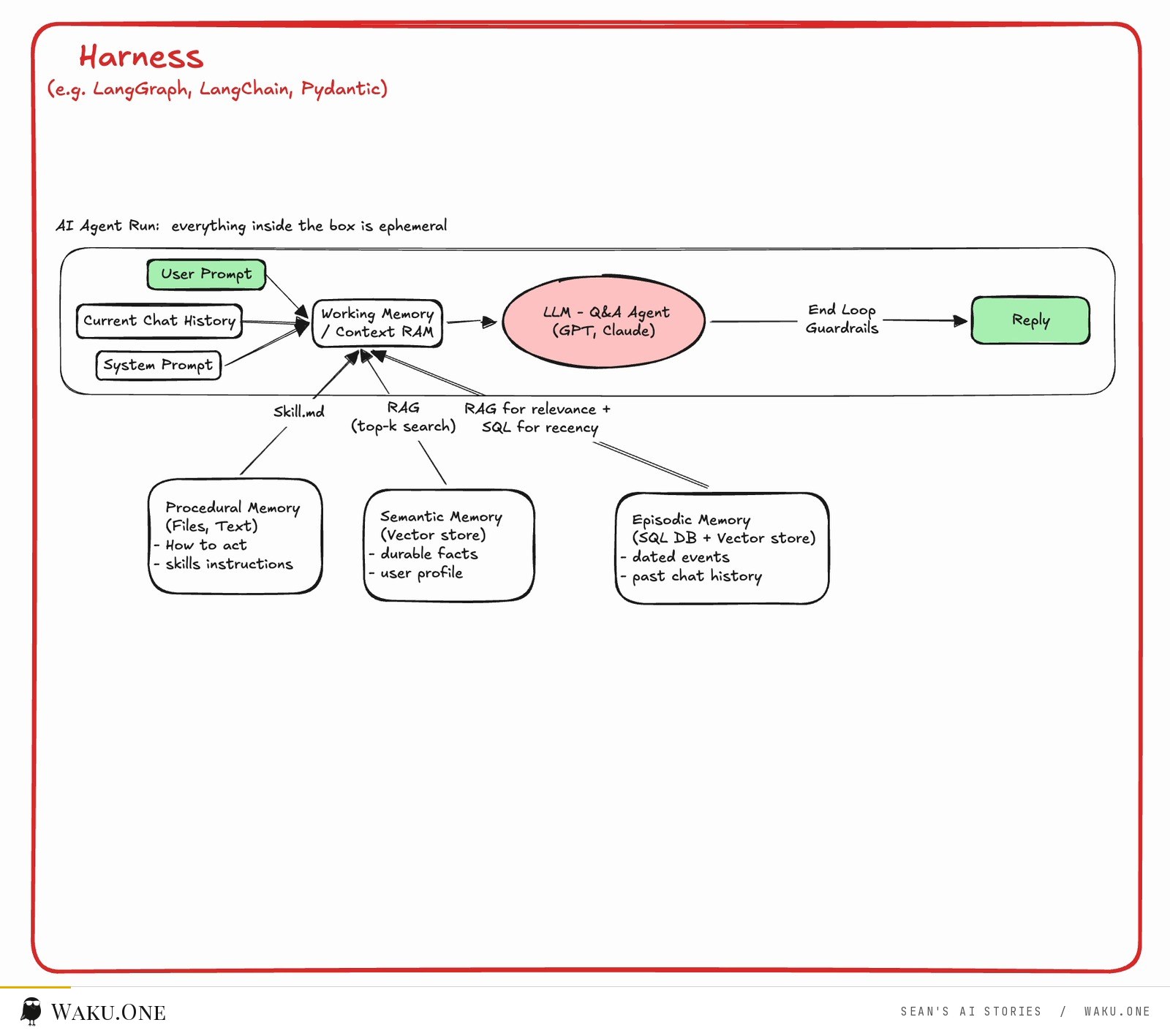
The harness is the red box: the framework that holds the run, the memories and every rule about how they connect. Sean names LangGraph, LangChain and Pydantic as tools people use to build one.
The model stays the same when you change the harness. What changes is what the model is given and what the model is allowed to do.
Keep memory fresh with a consolidation gate
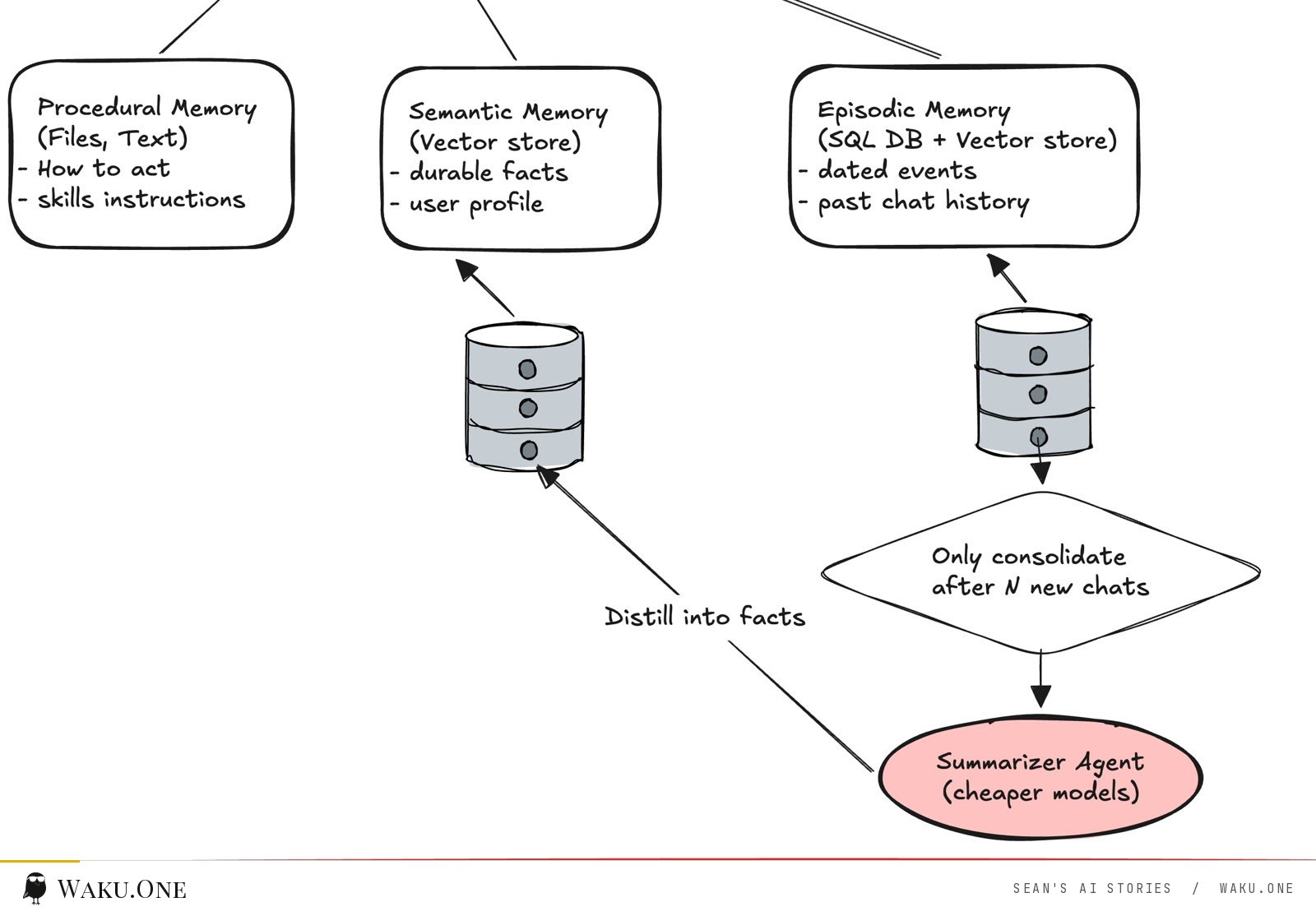
Memory needs a place to live and a way to update. After every reply the harness saves the messages to a database, so episodic memory grows by itself.
Semantic memory is harder. You can type the facts in, or the system can consolidate, which means turning many past conversations into a few lasting facts. Sean’s example is an online store whose customers have asked the same refund question many times. Those chats should become one fact.
The consolidation gate is the rule for how often consolidation runs. Running it after every chat is too expensive for a store with a million customers. Sean suggests a batch rule, for example after every 2,000 conversations. The batch goes to a summarizer agent, a second LLM with its own system prompt. The summarizer can be a cheaper model, because it reads a lot of text.
Getting memory back out
RAG, retrieval augmented generation, means finding the stored text whose meaning matches the question and adding that text to working memory. Semantic memory is read with RAG alone.
Episodic memory is a table of dated events, so the method depends on the question. “Show the last 10 conversations with this customer” needs only a SQL query, a filter on a data table. “Show the 20 conversations where a customer complained about quality and we did not resolve it” needs SQL for the dates and RAG for the meaning. The agent wants those 20 messages, and does not want all 2,000.
Add tools, a loop and a way to stop
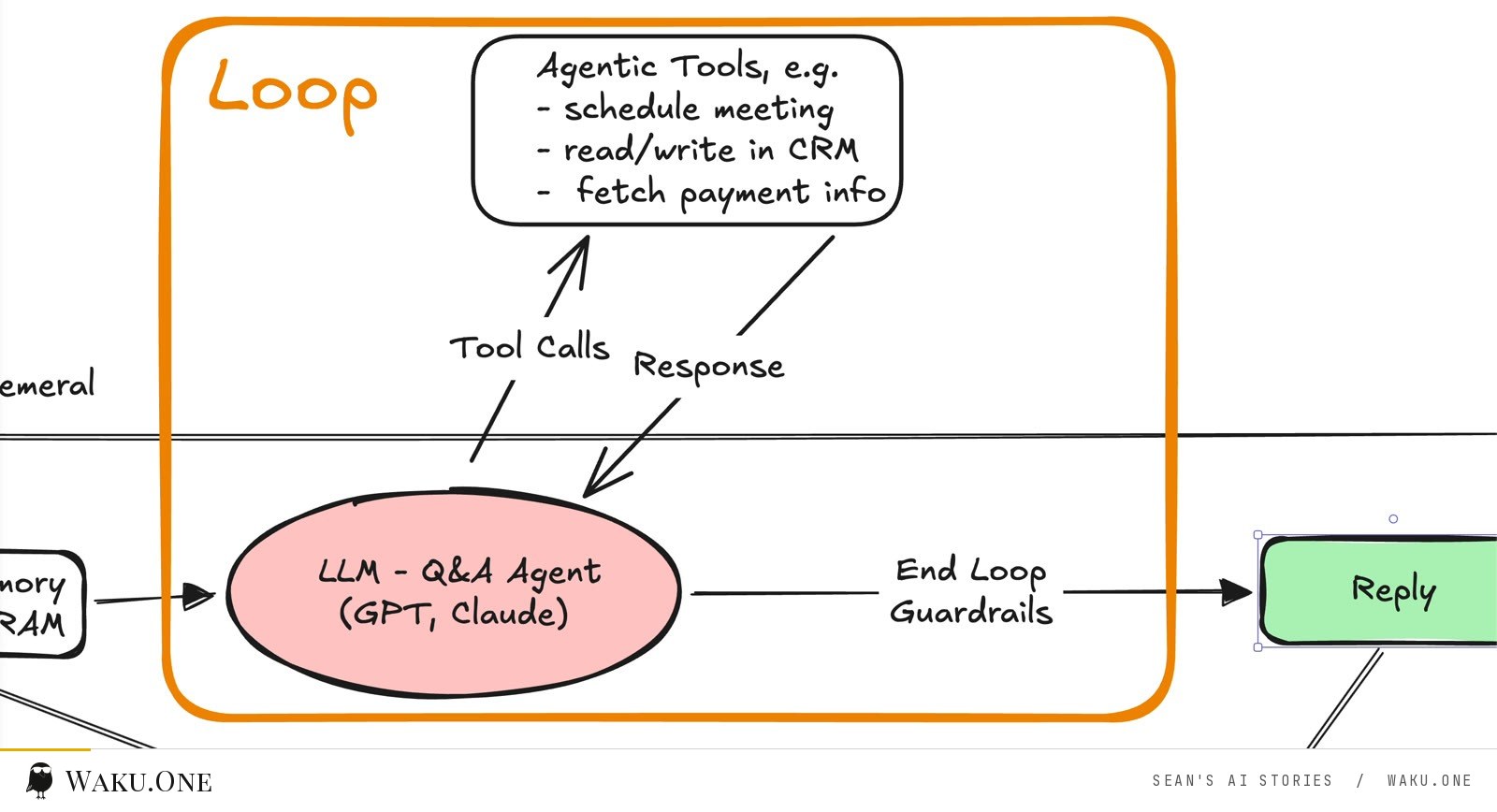
An agent does more than read memory. An agent also calls tools, which are actions in other systems: schedule a meeting, read or write a customer record, fetch a payment.
One task often needs several tool calls. A loop is the cycle of calling a tool, reading the response and deciding the next step. A model with full freedom could continue that cycle forever, or could stop at the wrong moment.
End-loop guardrails are the rules that say when a response is good enough to send. Loop engineering is the design of that cycle and those rules. The loop is part of the harness, because the loop is one more way to control the model.
The running example: refund the customers
A business owner sends one long request: find which customers complained about our products, suggest how to win them back, check whether the refunds were paid, and pay any refund that is missing.
- The agent reads the customer records. The agent finds 30 complaints in the past two months. 12 customers were refunded and 8 are still waiting.
- The agent compares that result with the request. The 8 waiting customers still need a follow-up.
- The agent makes a second tool call and schedules a meeting with each of the 8 customers.
- A more advanced agent makes a third tool call and triggers the 8 refunds through the payment provider.
- The end-loop guardrails confirm the task is done. The agent sends the reply.
The stopping point is a decision, and the owner should make that decision. During planning the agent can ask: “Should I refund the 8 customers, or list them so you can follow up?” The answer becomes the end of the loop.
Claude Code pauses when it needs a permission. Sean sets up a hook that sends a laptop notification whenever Claude Code is waiting for him. Without the hook he comes back after 30 minutes and finds the agent stopped 25 minutes earlier.
Close the loop with LLM Ops
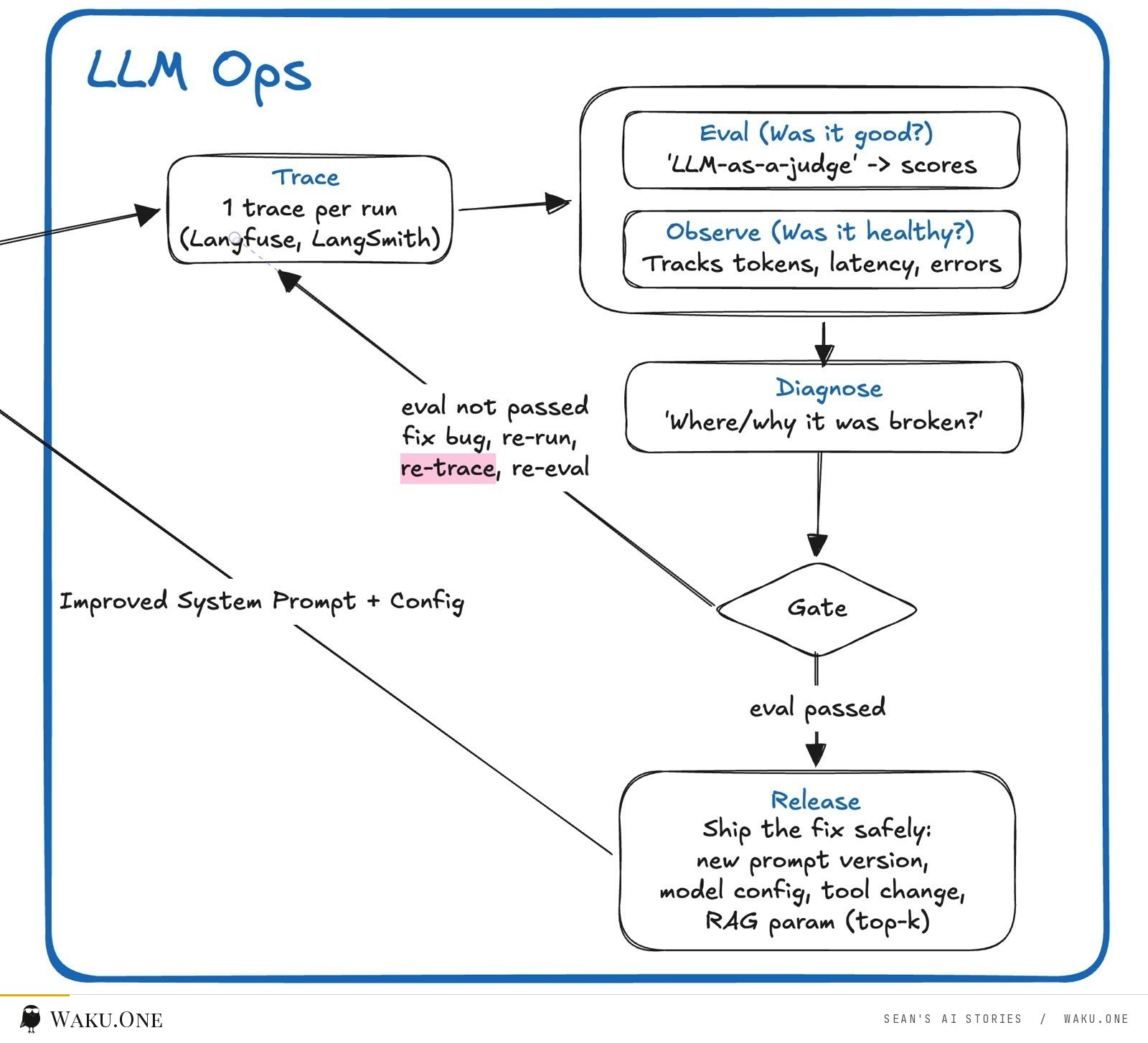
A finished harness has one large problem. Nobody knows how well the harness performs. LLM Ops, large language model operations, is the feedback system that measures each run and improves the harness.
| Step | Question it answers | What happens |
|---|---|---|
| Trace | What happened? | The system records one tree of events per run: the question, what was retrieved, each tool call, the response time and the tokens used. Sean names Langfuse and LangSmith. |
| Eval | Was it good? | A score for the result. A second LLM can act as the judge. Example: the task was to schedule a meeting, so did the meeting get scheduled? |
| Observe | Was it healthy? | Tokens, latency and errors. A reply that takes 20 seconds is a health problem even when the answer is right. |
| Diagnose | Where and why did it break? | Read the trace for the cause. A slow tool call, a working memory that is too large, or a retrieval the question never needed. |
| Ship | Is the fix safe to release? | A gate with rules you define. If eval passes, release a new prompt version, model setting, tool change or retrieval setting. If eval fails, fix the bug, re-run, re-trace and re-eval. |
For LLM Ops, one agent run still means one question and one reply. The number of tool calls inside the run does not change that.
The fixes are small and concrete: a better system prompt, a different model setting, a change to how memory is retrieved. One pass of trace, eval, diagnose and ship is one LLM Ops loop.
The whole system on one board
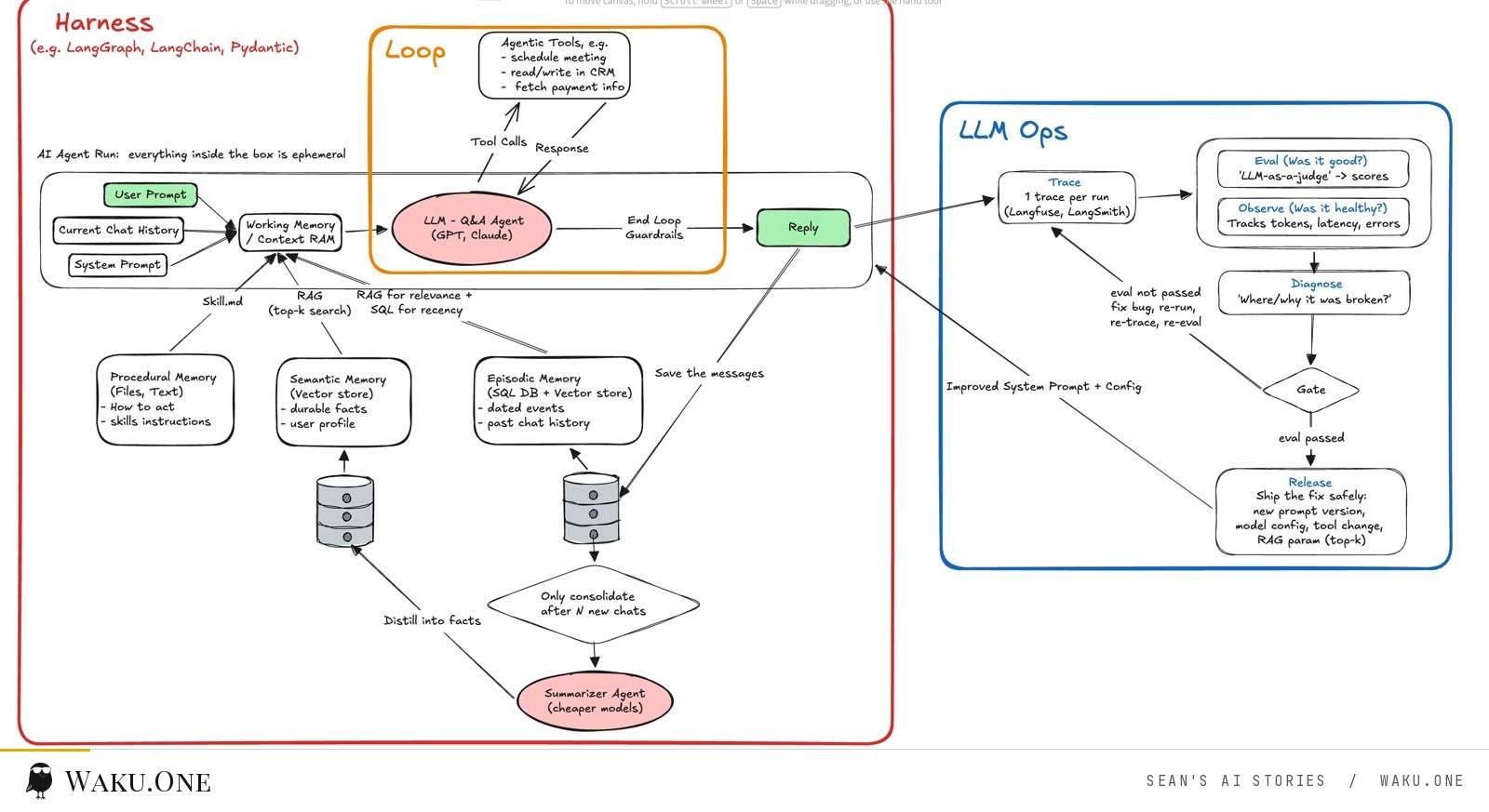
The harness controls the model. The loop lets the model finish a task and stop. LLM Ops checks every run and sends improvements back. Sean’s closing point is that the three together make a system that keeps improving with little manual work.
Glossary
- Agent harness
- The software around an LLM that controls what the model sees and does: memory, tools, rules and the loop.
- Agent run
- One trip from a user’s input to the agent’s reply, with any number of tool calls inside.
- Working memory
- The text the model can see during one run. Also called context RAM.
- System prompt
- The standing instruction for how the agent should behave.
- Procedural memory
- Stored instructions for how to act. Skills are one form.
- Semantic memory
- Stored durable facts, such as who the user is.
- Episodic memory
- A dated record of past events and chats.
- Consolidation gate
- The rule for when past chats are summarized into facts.
- RAG
- Retrieval augmented generation. Finding stored text by meaning and adding it to working memory.
- Top-k
- The number of best-matching results a retrieval returns. Editor’s note The whiteboard shows this term. The video does not define it.
- Loop
- The cycle of tool call, response and next decision inside one run.
- End-loop guardrails
- The rules that decide when the agent stops and replies.
- Trace
- The recorded tree of events for one run.
- Eval
- A score for whether a run was good, often given by a second LLM acting as judge.
- LLM Ops
- Large language model operations. The trace, eval, diagnose and ship cycle that improves the harness.
Questions people ask
What is an agent harness in one sentence?
An agent harness is the framework you build around a large language model so that the model works the way you want. The harness includes memory, tools, the loop and the rules for stopping.
Is the harness the same thing as the model?
No. The model is the part that predicts text. The harness is everything around the model. In Sean’s picture the model is the horse and the harness is what the rider uses to steer the horse.
Are LangChain and LangGraph harnesses?
Sean lists LangGraph, LangChain and Pydantic as tools that help you build a harness. The harness itself is the full system you assemble for your use case, including your memory stores and your stopping rules.
What is loop engineering?
Loop engineering is designing how an agent repeats tool calls and when the agent stops. Sean describes the loop as an architectural decision about when a result is good enough to send back.
How does an agent know when to stop?
End-loop guardrails tell the agent. The simplest guardrail is that the task is done. A stronger guardrail is agreed during planning, when the agent asks the user what a good ending looks like.
What is the difference between semantic and episodic memory?
Semantic memory holds facts that stay true, such as who the user is. Episodic memory holds what happened and when, such as past conversations. Consolidation turns many episodic records into a few semantic facts.
When is a SQL query enough, and when do I need RAG?
A SQL query is enough when the question is about recency or a simple filter, such as the last 10 conversations with one customer. RAG is needed when the question is about meaning, such as conversations that contain an unresolved quality complaint.
How is eval different from tracing?
Tracing collects the data. Eval judges the data. A trace records what the agent did in a run, and eval scores whether that run was good. Diagnosis then explains a bad score, and the gate decides whether the fix ships.
Watch the full video
This page is written from Sean’s 20 minute whiteboard session on the Sean’s AI Stories channel. Every chapter below opens the video at that moment.
Watch on YouTube →- The four AI agent buzzwords
- What an agent run is
- Procedural, semantic, episodic memory
- What harness means (the horse)
- Storing and updating memory
- Retrieval: RAG, SQL and semantic search
- Tool calling and why agents loop
- Loop engineering and end-loop guardrails
- A Claude Code hooks example
- Why you need eval and LLM Ops
- Tracing every run
- Evaluation: LLM as a judge
- Diagnosing what broke
- The gate: ship the fix or fix the bug
- Zoom out: the full system
Related topics
See it run
Editor’s note This section is not from the video. Waku Agent is the open source teaching harness Sean built after this video. Waku Agent has the same four parts in real code: harness, loop, memory and eval.
$ pip install waku-agentThe code is at github.com/ShenSeanChen/waku-agent. Sean walks through the code in a follow-up video.
Written from the transcript of “You Can Learn AI Agent Harness & Loop Engineering In 19 Min” and its whiteboard. Screenshots are from the original screen recording. Tools named on this page are the ones Sean names in the video.